sample-code.tsx
1import { c } from "@core/figure/speak";
2import type { PixiProperty } from "@core/figure/types";
3import { createGameState, createImageFigure, Game, useGameStore }
4 from "@core/index";
5import { createScene } from "@core/scene";
6import InputDialog from "@plugins/default/components/input-dialog";
7
8const state = createGameState("life", {
9  life: 2,
10  score: 0,
11});
12
13const right_position: PixiProperty = {
14  x: 592.36,
15  y: 145.13,
16  scaleX: 0.59,
17  scaleY: 0.59,
18  rotation: 0,
19  alpha: 0,
20  anchorX: 0,
21  anchorY: 0,
22};
23
24const judegment = createImageFigure("judegment", {
25  path: "/figures/EVE/Eve_Neutral.png",
26  name: "考官",
27  avatar: "/figures/EVE/Eve_Neutral.png",
28});
29
30const p = () => Game.parallel();
31
32export const entry = createScene("entry", async () => {
33  Game.audio.bgm("/audio/bgm/happy.mp3", { volume: 0.5, fadeIn: 1 });
34  Game.parallel(); // 同时加载背景和bgm
35  Game.background.img("/backgrounds/bg-classroom.png");
36  Game.narrate("欢迎来到Vyno小游戏"); // 游戏旁白
37  Game.narrate`接下来你会连续回答三组题目`;
38  Game.narrate`但是你只有${c("两点生命值", "red")} !!!`; // 使用富文本
39  judegment.show(right_position); // 以指定pixi属性加载角色
40  Game.wait(0);
41  judegment.fadeIn({ duration: 0.5 }); // 使用角色淡入动画
42  const Panel = () => { // 创建一个面板组件
43    const store = useGameStore(state);
44    return (
45      <div className="absolute top-4 left-1/2 -translate-x-1/2">
46        <div className="text-black bg-white p-4 rounded-2xl text-2xl">
47          <p>你还有${store.life}点生命值</p>
48          <p>你得了${store.score}分</p>
49        </div>
50      </div>
51    );
52  };
53  Game.mount("panel", <Panel />); // 挂载面板组件到游戏
54  p();
55  let userInput = "";
56  for (let i = 0; i < 3; i++) {
57    judegment.switch("/figures/EVE/Eve_Neutral.png");
58    Game.parallel();
59    // 从外部系统获取随机数
60    const num1 = await Game.use(() => Math.floor(Math.random() * 10));
61    const num2 = await Game.use(() => Math.floor(Math.random() * 10));
62    const result = num1 + num2;
63    Game.narrate`${num1} + ${num2} = ?`;
64    Game.parallel();
65    // 从用户组件获取输入
66    userInput = await Game.use<string>("target",
67     <InputDialog title="请输入你的答案" type="text" /
68     );
69    if (userInput === result.toString()) {
70      judegment.switch("/figures/EVE/Eve_Smile.png");
71      Game.wait(0);
72      judegment.bounce().speak`回答正确`;
73      Game.parallel();
74      // 响应式更新分数
75      await state.setState((prev) => ({
76        ...prev,
77        score: prev.score + 10,
78      }));
79    } else {
80      judegment.switch("/figures/EVE/Eve_Angry.png");
81      Game.wait(0);
82      judegment.shake().speak`回答错误!${{
83        text: `正确答案是${result}`,
84        style: {
85          color: "red",
86          fontWeight: "bold",
87          textDecorationLine: "underline",
88        },
89      }}`;
90      await state.setState((prev) => ({
91        ...prev,
92        life: prev.life - 1,
93      }));
94      if (state.getState().life <= 0) {
95        return failure;
96      }
97    }
98  }
99  return successs;
100});
101
102const successs = createScene("successs", async () => {
103  judegment.switch("/figures/EVE/Eve_Laugh.png").speak("恭喜你过关");
104  Game.narrate`你总共得了${state.getState().score}分`;
105});
106
107const failure = createScene("failure", async () => {
108  judegment.switch("/figures/EVE/Eve_Cry.png").speak("很遗憾,你失败了");
109  Game.narrate`你总共得了${state.getState().score}分`;
110  // 使用选择框组件
111  const again = await Game.use<string>(
112    "target",
113    <InputDialog
114      title="是否再来一次"
115      type="select-single"
116      options={[
117        { label: "是", value: "yes" },
118        { label: "否", value: "no" },
119      ]}
120    />
121  );
122  if (again === "yes") {
123    await state.setState((prev) => ({
124      ...prev,
125      life: 2,
126      score: 0,
127    }));
128    judegment.hide(); // 隐藏角色
129    Game.narrate`` // 关闭对话框
130    return entry;
131  }
132});
133
轻松构建细粒度的叙事体验
无需学习新语言,没有固定模板——只需代码+故事。
TypeScript 优先设计
使用完整的类型安全和编辑器支持编写故事。直接在代码中定义场景、对话和逻辑——无需自定义脚本语言。
轻量级且可扩展
极少的核心代码,应用层代码随项目扩展。无论是短篇视觉小说还是复杂的分支故事,框架都保持快速和可维护性。
基于组件的架构
使用可重用的 React 组件构建每个场景、角色和选择。就像构建任何现代 Web 应用一样灵活修改布局和行为。
为什么选择 TypeScript
类型安全、IDE 支持,也可降级到 JavaScript 编码,为更智能的开发提供动力。
类型安全的故事编写
利用 TypeScript 的智能自动完成和错误检查功能,编写更可靠、更易维护的故事代码。
命令式逻辑与web生态
使用 JavaScript/TypeScript 的完整生态系统构建条件逻辑、可重用组件和动态叙事。
直观的控制语法
程序逻辑清晰、故事编写感觉自然、表达力强。
What's more You Unlock with Vyno
运行时数据获取
使用 Game.use() 在场景中获取外部数据或用户输入。支持异步函数、React 组件挂载,数据自动纳入存档恢复机制。
runtime-data.tsx
1const scene = createScene('scene', async () => {
2  // 获取随机数
3  const random = await Game.use(() => Math.random());
4
5  // 获取用户输入
6  const name = await Game.use<string>(
7    "input",
8    <InputDialog title="请输入名字" type="text" />
9  );
10  figure.speak`你好,${name}!`;
11  // 发起异步请求
12  const data = await Game.use(()=>
13    fetch('https://api.example.com/data')
14    .then(res=>res.json())
15  )
16});
What's more You Unlock with Vyno
灵活的 JSX 组件装饰
使用 Game.mount() 在任意时机挂载自定义 React 组件。全局组件持久显示,局部组件随场景切换自动卸载。
jsx-components.tsx
1// 全局组件 - 持久显示
2const GlobalComponent = (props:{title?: string})=>
3  <div className="w-10 h-10 bg-red-500">
4    GlobalComponent {props.title}
5  </div>
6
7registerGlobalJsxComponent('GlobalComponent', GlobalComponent)
8
9export const entry = createScene("entry", async () => {
10  Game.narrate`挂载全局组件`
11  Game.mount('global', <GlobalComponent title="123" />)
12  const Local = () =>
13    <div className="w-10 h-10 bg-blue-500">
14    LocalComponent
15    </div>
16  Game.narrate`挂载局部组件`
17  Game.mount('local', <Local />)
18  Game.narrate`退出场景,应该即将卸载局部组件,但是全局组件不会卸载`
19  return scene2
20})
21
22const scene2 = createScene("scene2", async () => {
23  Game.narrate`进入场景2,应该不存在局部组件`
24  Game.narrate`卸载全局组件`
25  Game.unmount('global')
26  Game.narrate`退出场景,应该不存在全局组件`
27})
What's more You Unlock with Vyno
响应式游戏状态
使用 createGameState() 创建可持久化的游戏状态,配合 useGameStore() 在 React 组件中响应式订阅,状态变更自动触发 UI 更新。
game-state.tsx
1// 创建游戏状态
2const playerState = createGameState('player', {
3  name: '',
4  money: 100,
5});
6
7// React 组件中使用
8function MoneyDisplay() {
9  const money = useGameStore(playerState, s => s.money);
10  return <div>金币: {money}</div>;
11}
12
13// 场景中更新状态
14const scene = createScene('scene', async () => {
15  await playerState.setState({ money: 200 });
16})
What's more You Unlock with Vyno
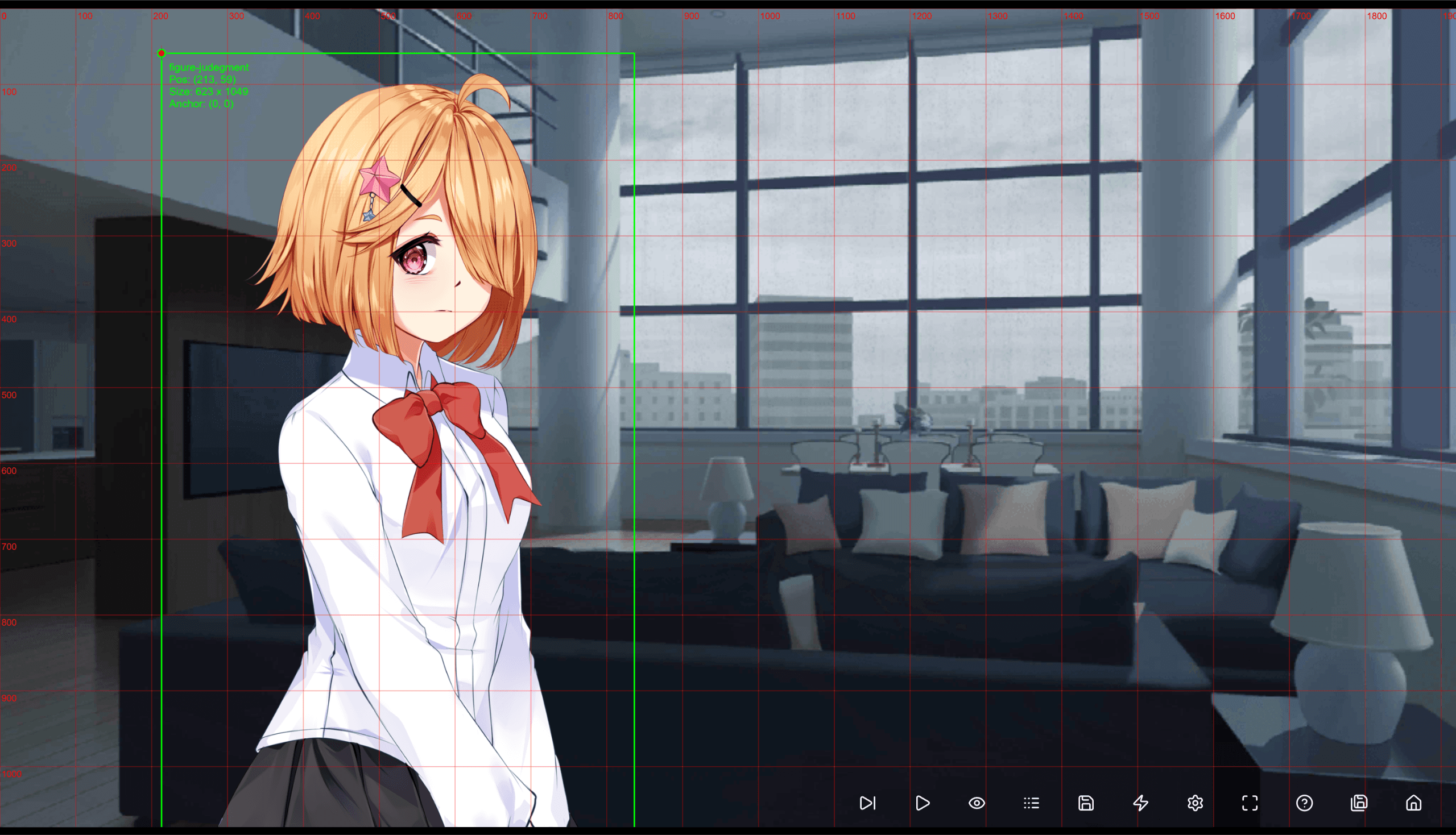
可视化属性编辑
在开发模式中,用鼠标来移动、旋转、缩放你的角色,一键复制动画属性到代码中。所见即所得的编辑体验。